> ## Documentation Index
> Fetch the complete documentation index at: https://help.ondeckapps.com/llms.txt
> Use this file to discover all available pages before exploring further.
# Shared values and variables: define once, use everywhere
> Use the Variables window to define values once and reuse them across text inputs and automations.
The Variables window lets you define a value once and use it across text inputs and automations, instead of retyping it in each place. When the value changes, everywhere that uses it stays consistent.
## Open the Variables window
Choose `Window > Variables` or `View > Variables`. The window has two sections:
* **Suggested Variables:** values Relay offers automatically, grouped by source. Wireless telemetry from Shure devices appears here.
* **Custom Variables:** values you add yourself.
## Suggested wireless variables
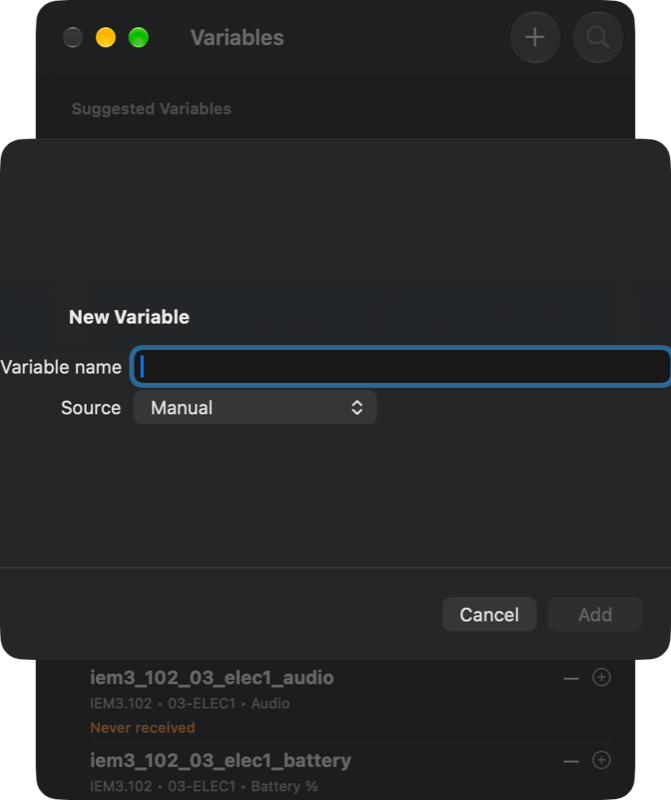
Relay suggests a variable for each metric a wireless channel reports: **Audio**, **Battery %**, and **RF**. Each suggestion is named after the device and channel you saved, followed by the metric, and shows its device, channel, and metric underneath. For example, the battery level of a channel called `01-DRUMS` on device `IEM3.101` appears as `iem3_101_01_drums_battery`.
Each row also shows its status, such as **Never received** until Relay has heard from the device. Each row also has `+` and `−` controls.
Because suggestions use the names you saved for your devices, a battery or RF value is easy to recognize. See [Wireless devices](/relay/integrations/wireless-devices) for how to add and name your devices.
## Add a custom variable
1. Open the Variables window.
2. Select the `+` button in the window toolbar (**Add Manual Variable**).
3. Enter a **Variable name**. The **Source** is set to **Manual**.
4. Choose `Add`.
Use the search button to find a variable in a long list.
 ## Where you can use them
* **Text inputs**, such as the [Text module](/relay/dashboards/modules/utility#text).
* **Automations**, alongside the [variable utility nodes](/relay/dashboards/nodes/utilities) in Automation View.
## Related
Use variables inside graphs.
Wireless telemetry variables are suggested for live production.
## Where you can use them
* **Text inputs**, such as the [Text module](/relay/dashboards/modules/utility#text).
* **Automations**, alongside the [variable utility nodes](/relay/dashboards/nodes/utilities) in Automation View.
## Related
Use variables inside graphs.
Wireless telemetry variables are suggested for live production.